Farming Simulator 25 · mod manager · free & open source
Organize hundreds of mods, and Silo reads the game log to name the mod that actually crashed you, catches conflicts before you launch, verifies a mod is the real build, and pulls ModHub and GitHub into one catalog. Its changes to your mod folder are designed to be reversible.
The problem
Everything drops into one mods/ folder and loads at once. When something breaks, the game won't tell you which mod did it. Silo handles the parts the game skipped.
The log scrolls a wall of red and names nothing. You disable mods at random and pray.
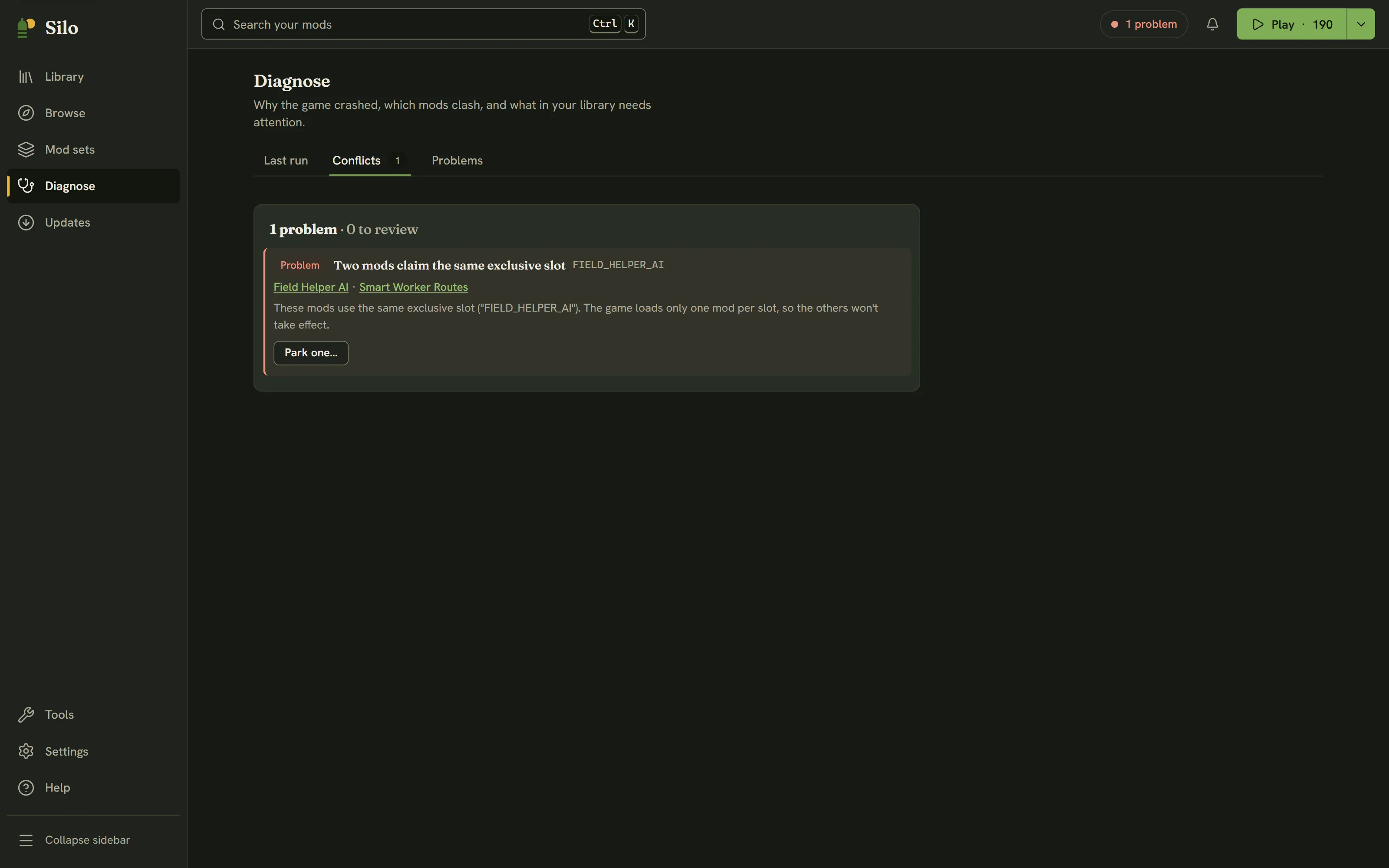
Two mods claim the same map, filltype or vehicle type. One quietly wins, or your save corrupts.
ModHub says outdated, GitHub shipped days ago, and you can't tell which number is real.
A mod lives on ModHub, its dev on GitHub. No one place tells the whole story.
What Silo does
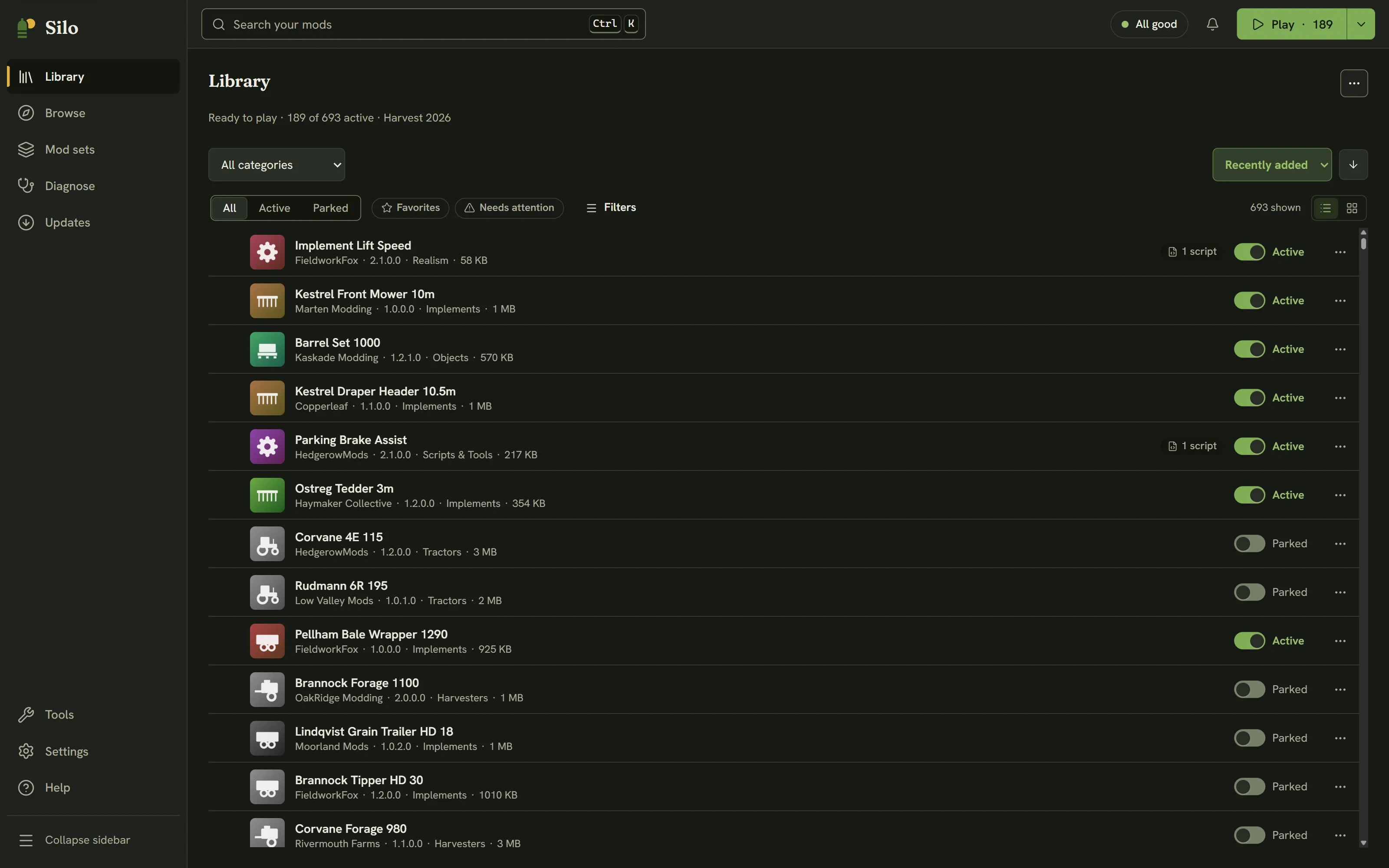
Unpacking archives, decoding icons, hashing files: the slow work runs in Rust, off the UI thread. The app stays quick even with 700+ mods installed.
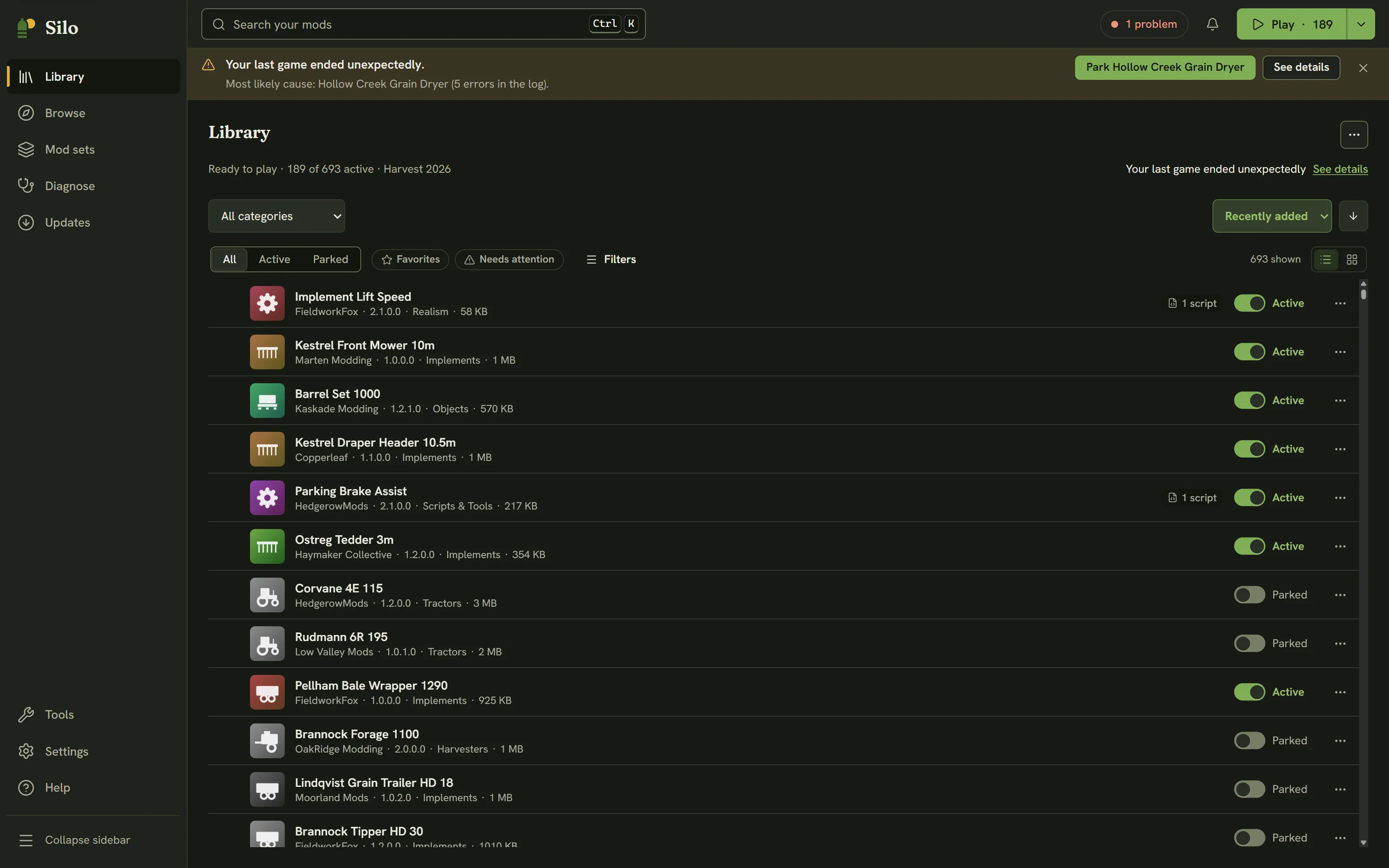
Silo reads log.txt, filters out the cosmetic noise, and ranks the mod most likely at fault. When the log can't name it, guided bisection isolates the culprit — no more disabling things at random.
Two active maps crashes the game on load. Silo catches that before you launch, along with filltypes, vehicle types and scripts that collide across your set.
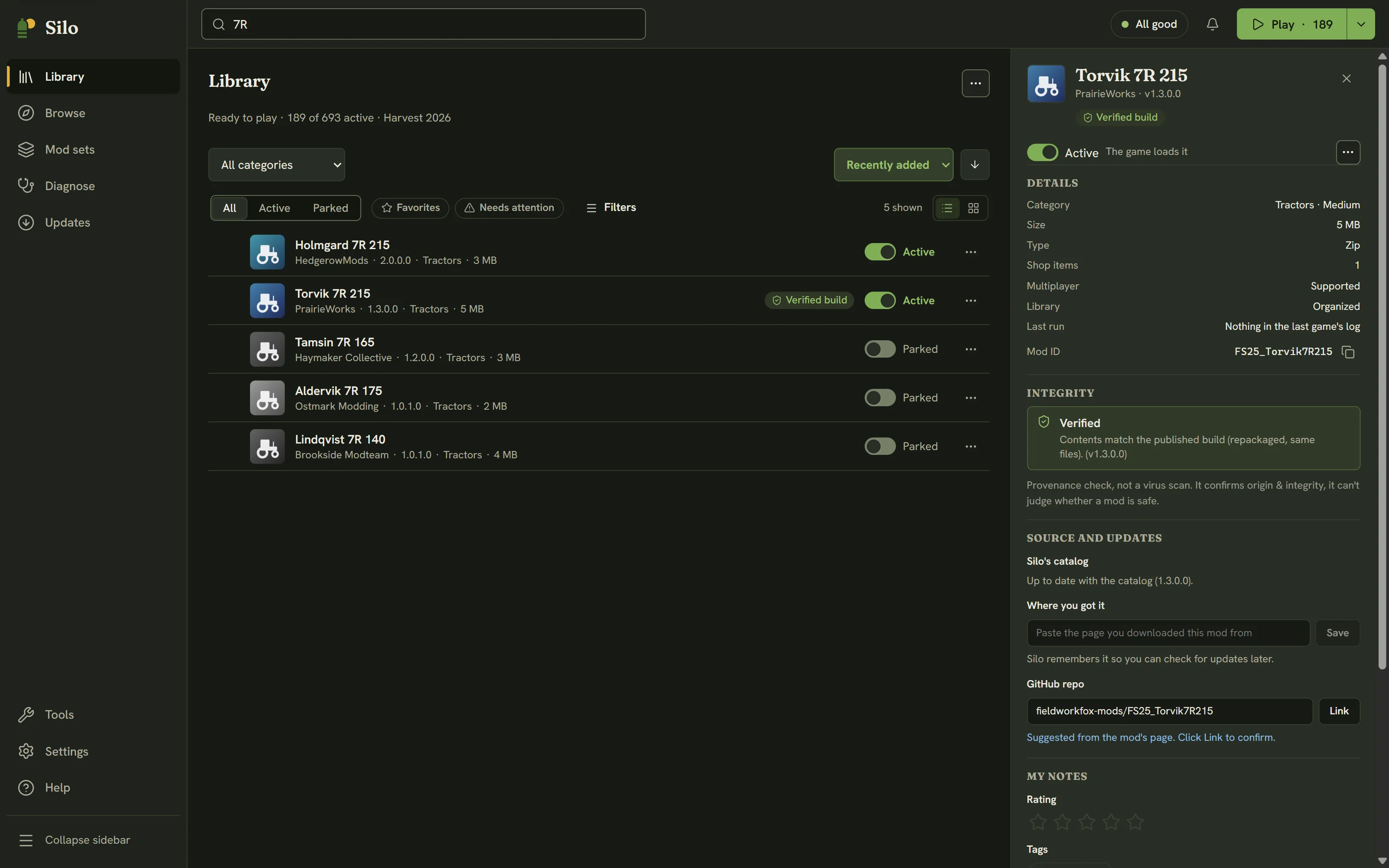
One record per mod that pulls ModHub and GitHub together, so you see the latest version found across them instead of whichever source happened to update last.
Silo hashes an installed mod and checks it against the trusted build its source published — a clean match, or the exact files that were changed. Provenance, not antivirus: it confirms what a mod is, it doesn't guess intent. It works across ModHub and GitHub — a cross-source integrity check that's rare among mod tools.
When the log won't name the culprit, Silo runs the disable-half-and-relaunch routine for you until it's cornered, then puts your active set back exactly as it was.
Build a profile for each playthrough. At launch, Silo links only the active set into the game folder with junctions — your zips live in a local archive it can restore with one click.
Generates a small companion mod that teaches your equipment a map filltype it stubbornly refuses to load. The sugar-beet fix, with no vehicle edits.
Star the repo on GitHub, jump to the ModHub page to rate it, all through your own accounts. Silo just opens the door. Your credentials and data stay yours.
See it
Real screens — click any to enlarge.
Why you can trust it
// open
The desktop app's every line is on GitHub. Audit it, fork it, build it yourself.
// quiet
Silo hits the network only for catalog search, update and integrity checks, cover images, and the source actions you choose — sending just what those need (search terms; mod IDs and versions). No telemetry, no analytics; your saves, mod files and notes never leave your machine.
// safe
Silo files your mods into a local archive and links the active set into the game. Every move is recorded and undoable, it only ever removes files it put there itself, and it backs up before it overwrites anything.
// everywhere
One native app, per-OS game discovery, no runtime. Windows is tested; macOS & Linux are experimental and seeking testers.
How it works
Silo finds your mods folder and unpacks every archive in the background, sorting each one by type. The result is cached, so the next scan is instant.
Sort, tag and rate your mods, then build loadouts. Conflicts and update status show up here, before you ever launch the game.
At launch, only your active set gets linked into the game folder. Quit, switch profiles and relaunch as often as you like — the links flip; your archived zips stay put.
Questions
Yes, and it always will be. Silo is open source, with no account to create, no paid tier, and no telemetry. The app talks to the Silo catalog only for search, update checks, images and the source actions you choose — never your data. The desktop app's every line is on GitHub to audit or build yourself.
It manages your Farming Simulator 25 mods. Silo organizes the library and reads log.txt to name the mod that crashed you. It flags conflicts such as duplicate maps and colliding filltypes, vehicle types or scripts. And it pulls ModHub and GitHub into one catalog that shows the latest version found across both.
It moves them, but reversibly. Silo files your ZIPs into a local archive, then links only your active set into the game's mods folder at launch. Every move is recorded so it can be undone, and it backs up before it overwrites anything or edits a savegame.
Windows is the tested, supported platform today. macOS (Intel & Apple Silicon) and Linux builds exist but are experimental and largely untested — we're actively seeking testers on those platforms. It's one native app with per-OS game discovery and no runtime to install.
Yes. Silo keeps one record per mod that pulls both together, so you see the latest version found across them. You can act on each through your own accounts: star on GitHub, rate on ModHub. Silo just opens the door; your credentials stay on your machine.
No telemetry, no account, no analytics. Catalog search sends your search terms, and update and integrity checks send the mod identifiers and versions needed to answer — nothing more. Silo never uploads your saves, mod archives, notes or personal files; your library and actions stay on your machine and in your own source accounts.
Download
Free and open source. Grab the installer for your platform, or build it from source.
Windows is the tested platform; macOS & Linux are experimental and largely untested — testers welcome. Windows installers are digitally signed by a verified publisher (SmartScreen may still prompt on brand-new releases while reputation builds, but shows the publisher, not "unknown"). macOS & Linux builds are open source and unsigned — Gatekeeper may warn; you can read or build the source to verify. Silo updates itself from here on — it checks on launch and installs the next version in one click.