
Help · Tools
Fill type bridge
Some maps add their own fill types, such as a custom crop or material, that none of your equipment will handle. Farming Simulator 25 decides what a trailer, shovel, silo or sell point can take by category: a trailer takes BULK, a front loader takes SHOVEL, and so on. When a map’s fill type isn’t in any category your equipment accepts, nothing can harvest, haul, store or sell it, and there’s no setting in the game to change that.
The Fill type bridge fixes this without editing any vehicle or other mod. Silo builds a small companion mod whose only job is to add the fill type to the categories you choose. It refers to the fill type by name and adds nothing else: no textures, no new definition, no balance changes.
When to use it
Use it when a map’s fill type won’t work with equipment that should obviously handle it: your trailer won’t fill, a silo won’t store it, or a sell point doesn’t list it. The classic case is a sugar beet style crop that a map adds and the base game trailers ignore.
Making a bridge mod
- Open Tools in the left rail and choose the Fill type bridge tab.
- In Fill type name(s), type the internal name or names, separated by spaces or commas, for example
SUGARBEET BEETPULP. Case doesn’t matter. If you’re not sure, it’s usually the crop or material name in capitals; the mod that adds it will have it. The names Silo picked up appear as chips below the field. - Under Add to, choose the categories. They’re grouped as Haul & load, Store & sell and Forage & feed. Trailers, tippers, front loaders, farm silos and bulk sell points are chosen to start with.
- Keep the Mod name or change it. It must start with
FS25_, and it becomes the name of the.zipfile. - Click Generate bridge mod.
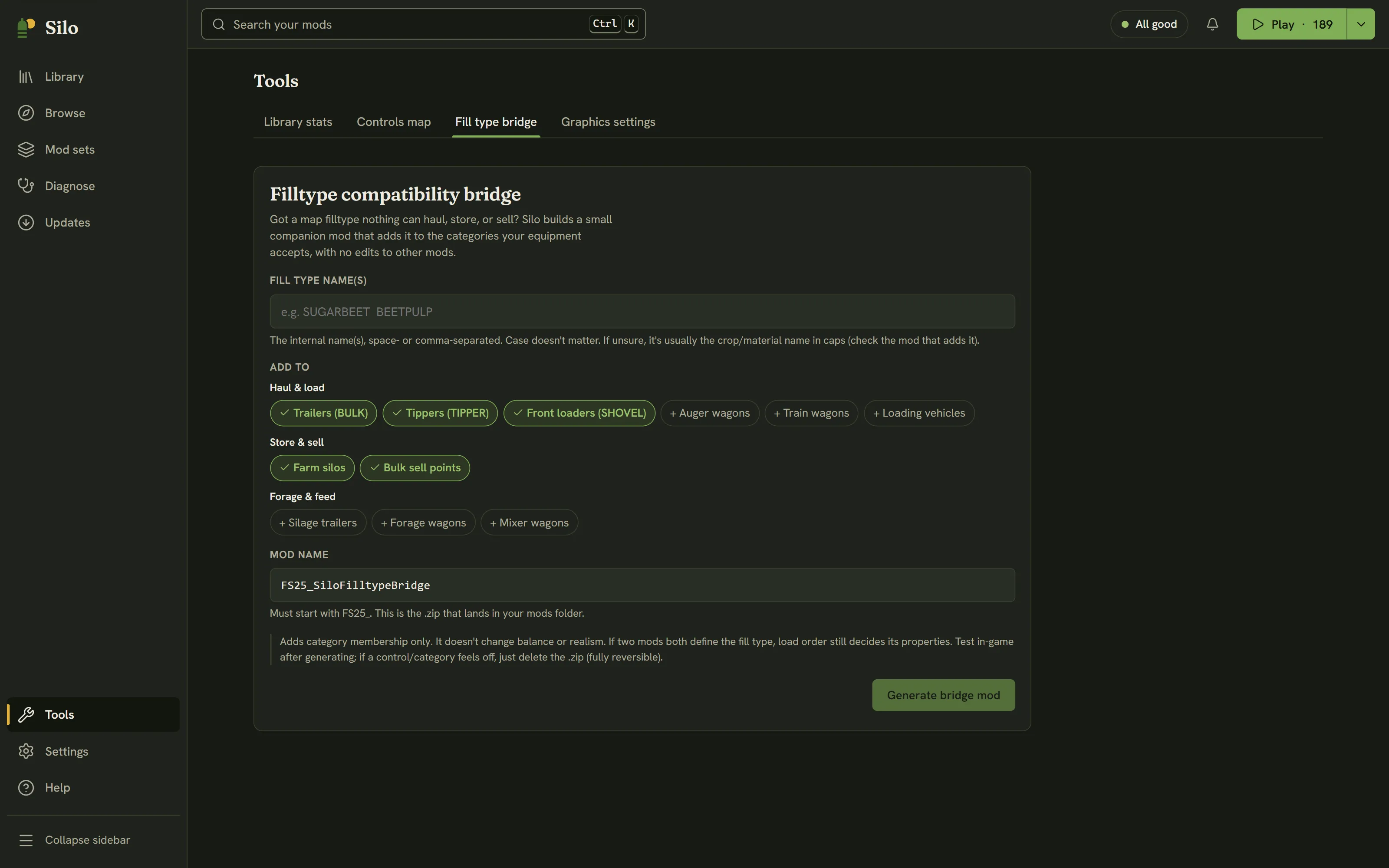
Silo writes the .zip into your mods folder and reads your library again, so the new mod shows up in the Library straight away. Make sure it’s active, load your save, and the fill type should now work with the equipment in the categories you chose.
Undoing it
The bridge only adds category membership. It doesn’t change prices, capacities or realism. If two mods both define the fill type, load order still decides its properties. To undo it, park the bridge mod: it’s a loose zip, so Park files it away, with Undo. Deleting its .zip from your mods folder works too.
Silo never overwrites a file. If a mod with the same name is already in your mods folder, it stops and tells you, so pick another name or remove the old bridge first. While another change to your library is running, such as a mod set switch, Silo asks you to try again when it’s done.
A bridge mod declares multiplayer support. Multiplayer compares mod files, so everyone in the session needs the same bridge file: the host shares their .zip, rather than each player generating their own.
Written for Silo 1.0. Something out of date? Tell us.