
Help · Mod sets
Mod sets
A mod set is a saved list of active mods. If you run several farms, say a heavy seasonal save, a light co-op save and a near-vanilla test, each wants different mods switched on. Save each mix once as a set, then switch between them when you change games instead of turning dozens of mods on and off by hand.
A set holds the list only, never the mod files. Switching to a set turns mods on and parks the rest, and parking a mod never deletes it. Deleting a set leaves your mods exactly as they are.
Open Mod sets in the left rail (Alt+3). The My sets tab lists every set with how many mods it holds and how it compares with your active mods right now: Same, or a count such as +31 / −77 (31 would turn on, 77 would be parked). A set that names mods you don’t have also says how many aren’t in your library. The set that matches your active mods carries an Active badge.
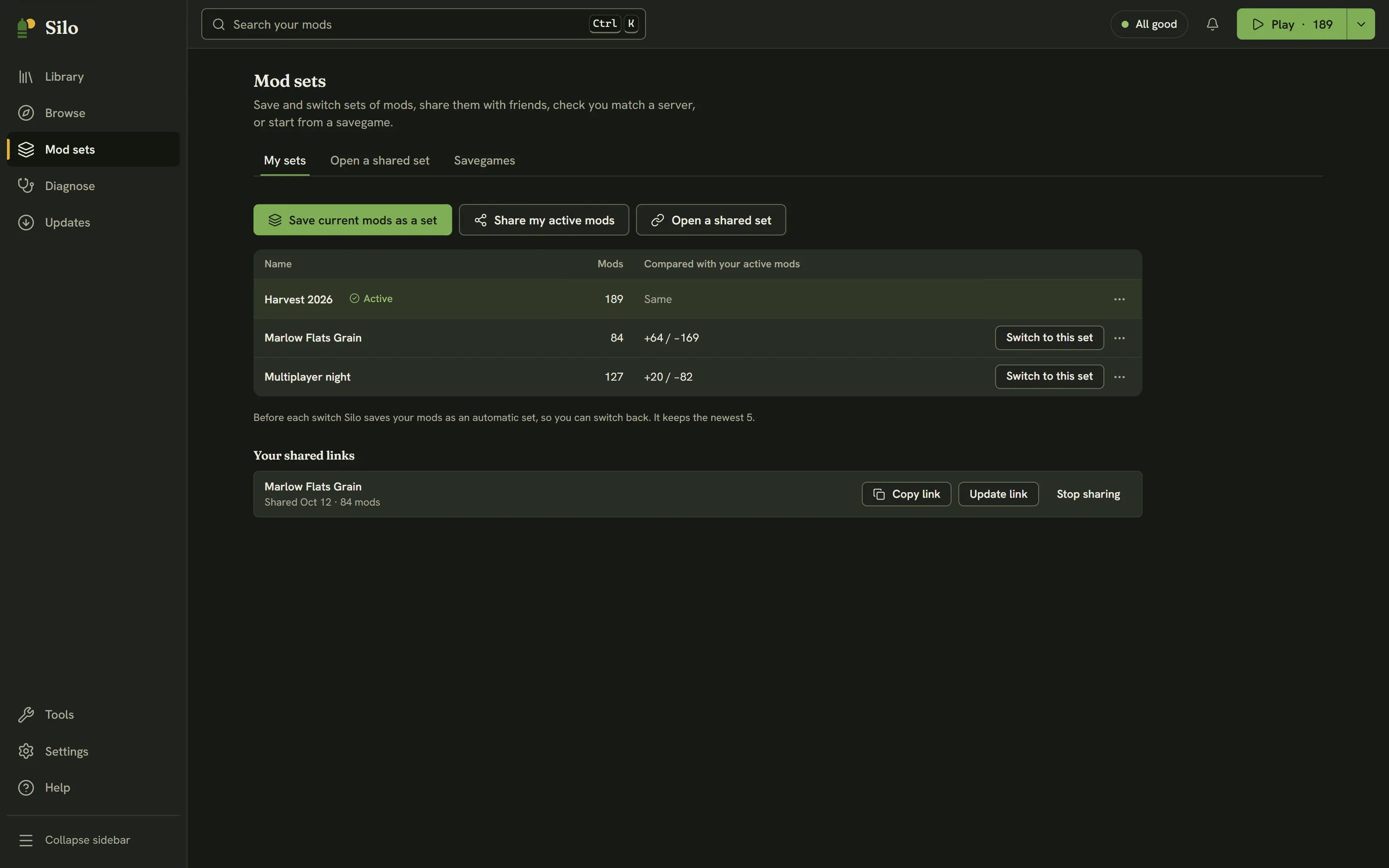
Saving your current mods as a set
Turn on the mods you want in the Library, then click Save current mods as a set and type a name. If you already have a set with that name, Silo asks whether to replace it. The button is off while no mods are active.
Switching to a set
Click Switch to this set. Before anything changes, Silo shows what will happen: how many mods turn on, how many are parked, and the list of changes. Mods the set names that aren’t in your library stay off until you get them. Click Switch to go ahead.
Before it switches, Silo saves the mods you had on as an automatic set named after the switch, such as “Before Forestry weekend”. Automatic sets are marked Automatic with the date and have a Switch back button. Silo keeps the newest five. After the switch, a toast offers Undo, which puts your previous mods back.
Changing or removing a set
The ⋯ menu on each row has:
- Update from current mods: replaces the set’s list with the mods you have on now. Silo first says how many are added and removed, and your active mods don’t change. A toast offers Undo.
- Share…: sends the set as a link or a file. See Sharing and opening mod sets.
- Delete: removes the set after you confirm. Your mods aren’t affected, and a toast offers Undo.
Automatic sets can be shared or deleted but not updated, because Silo prunes them later. Save your current mods as a new set instead.
Adding mods to several sets at once
You can add mods to your sets, or take them out, from the Library. Select one or more mods and click Mod sets… in the selection bar, or choose Mod sets… from a single mod’s row menu.
The dialog lists your saved sets, each with a checkbox. Automatic “Before …” sets aren’t listed.
- Ticked: every mod you chose is in that set.
- Unticked: none of them is.
- Mixed: some are.
Click a box to change it, then Save. Tick all adds the mods you chose to every set in the list in one click, and Untick all takes them out of every set. If you have no saved sets yet, the dialog says to save one on the Mod sets page first.
Editing the set you’re on also turns those mods on or parks them, so you stay on that set. The dialog says so beside that set: “also turns them on now” or “also parks them now”.
After Save, a toast offers Undo, which puts every set back and reverses any turn-on or park. If mods you took out of sets are still on, it also offers Park them too (Park it too for one mod).
When your mods drift from a set
Silo remembers the set you last switched to. If you turn a mod on or off afterwards, Silo shows how far you’ve moved from that set instead of forgetting it:
- The Library status strip shows, for example, “Custom (3 changes since Harvest 2026)”.
- The Play menu (the arrow beside Play) starts with “Custom: 3 changes since Harvest 2026”, and offers Update Harvest 2026 from current mods and Save current mods as a new set. While nothing has changed it reads “Harvest 2026, unchanged”.
- My sets shows the same note with Update the set and Save as new.
Manage mod sets in the Play menu opens this page.
Saving, replacing and deleting sets wait while another change to your library is running, such as a library archive move. The buttons say why they’re off.
To start from the mods a savegame used, see Savegames.
Written for Silo 1.0. Something out of date? Tell us.